
Root android by one click 100% working
Root android by just one single click 100% working
Contents
The best advantages you can take from an android phone is just after rooting it.So,I will tell you all about how you can root your android phone within minutes.
So,before going further on how to root android without PC,let me firstly discuss about root and its features and all the stuff related to it.
What basically root is?
Root is having the privileged control of a mobile phone system,after rooting your android device, you can conduct a comprehensive management and optimization on your phone such as removing any pre installed system app, disabling startup apps and replacing the system font, etc.
Why is it important to manage Root permission?
After getting the root permission,app can access to all device and system functions which may out your phone at risk.Authorization management can effectively monitor app behavior and manages root permissions. It help prevent the abuse of highest privileges and to keep your phone safe from vulnerabilities.
Warranty
Yes, Rooting your phone will void your warranty but you can also un-root your phone easily and that too by using the same kingroot app. And hence, your warranty comes back again.
So, Let’s start the process of root by using the kingroot app.
- First of all,you can download the root checker app from playstore like I have done and can check that the device is not rooted like this
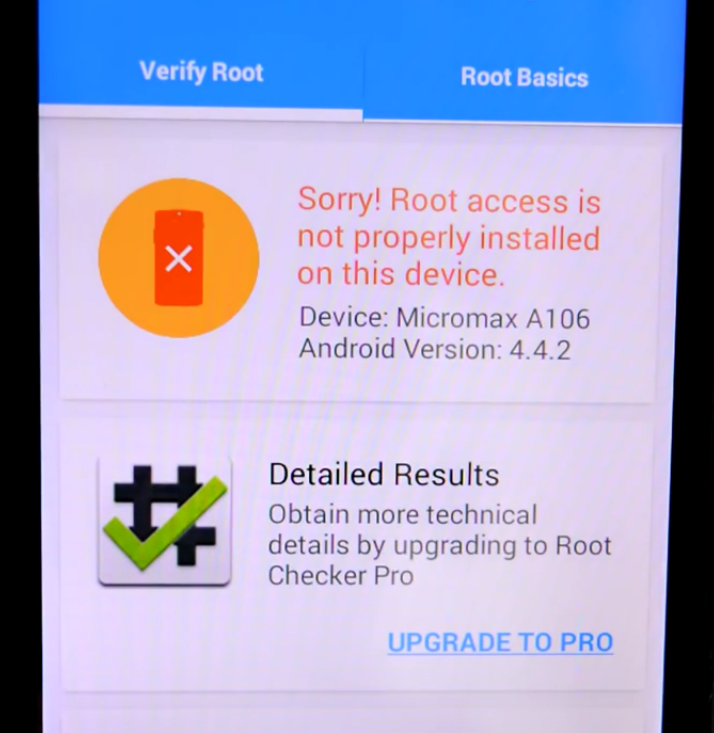
root android - Now,before going to the rooting process, firstly you need to turn ON your developer options.For that firstly go to your phone settings and then go to About phone option and scroll down and click on build number seven times and you will become a developer

root android - Now, Go back one step under settings and click on Developer options

root android - Now, turn developer options ON and also scroll down and turn ON the USB Debugging option.
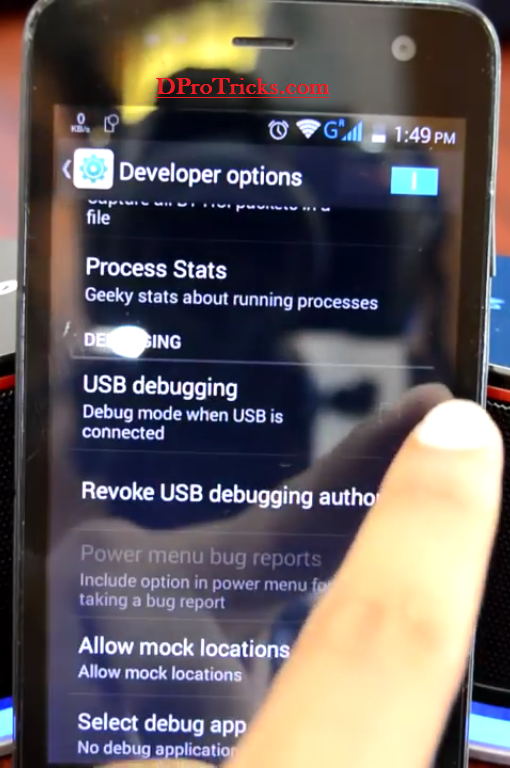
root android - Now,you need to download the kingroot app and the link to download the app is given at the end of the procedure.
- And simply, just install it and open it

root android And then, click on the Root option.
- Just wait for the app to complete the rooting process

root android - There you go, CONGRATS! Your device is then rooted showing the ROOT SUCCESSFUL message.

root android - Now, you can also check the root status by again using the root checker app.Open up the app and click on Allow
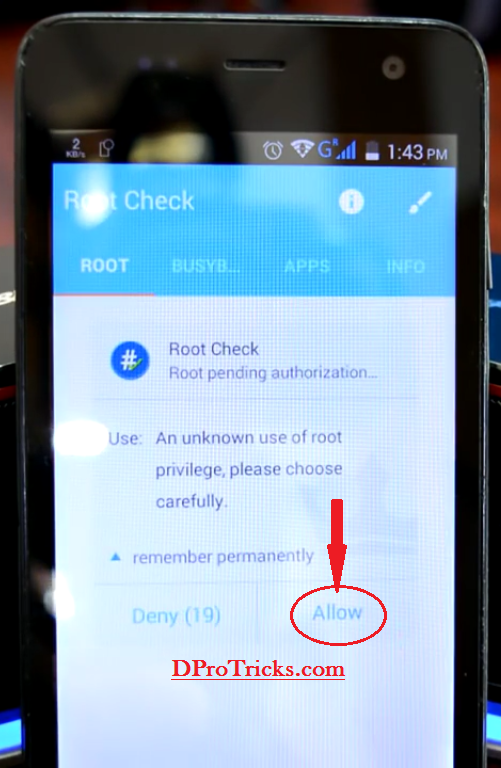
root android - You will see the root check result and it will show you that your device is rooted

root android
ROOT done!
NOTE:
1.Your device battery should be at least 30%.
2.Your data or net connection should be ON during the root process.
3.If your device failed to root by this app then go for the PC version of the same app.
If you are still facing any problem regarding the article: ‘How to Root android with one click without PC’, write down below in the comments section and I will try my best helping you out with that.
Stay inaoimftrve, San Diego, yeah boy!
How to root samsung galaxy sm-j210f 6.0.1 without pc i have no pc please ! Hepl me..
Hello Hritik! Sorry for the delay. You can also root samsung galaxy sm-j210f 6.0.1 without pc by the same method. Only the difference would be that you need to install the latest version of kingroot apk. If still that could not work, switch to version prior to that. It will easily root your phone.
Hello i rooted my phone using kingrootit worked for one week then on some hateful day i was online a d all of the sudden i saw a popup “com.kinguser has stopped” I quickly rebooted the phone but guess what some of my systems apps were gone and also kingroot app had uninstalled itself! I have tried to re root but every rooting app has failed……please I need help all views are appreciated in advance ….note please suggest any solution for my problems which doesn’t require . a p.c
thanks:Abdul please suggest a solution?????
if you don’t have a pc, I would suggest you to take it to a repairing shop and ask them to flash it. There would be some problem in the firmware. This is a very unfortunate and rare case. But installing its rom again will definitely solve your problem. The best and easy solution at this stage for you would be Flashing the firmware again. I have other ways but they are long and will be a headache for you. Because that includes rooting phone again and then installing a custom recovery in it and then you will have to download its stock ROM from the official website or from somewhere else. And then you need to flash it again using the custom recovery. That’s a very long process and is risky too Because you are asking for the solution without PC. So, I would suggest you to take it to the repairing shop. 🙂
I want to root my vivo y51l Android version 5.0.2 and kingroot is not working on it please help
Gaurav Sir, try to get the latest version of king root app because the latest app would be supporting for new phones. If that didn’t work, then install and check apps> kingoroot, towel root.
Great article about android Rooting keep it up 🙂
Keep coming!
Cheers!
My device is xiaomi redmi 4. King root is not working for my device. I hve also tried many others app but nothing happens. Plz help me to root my device my bootloader is unlocked.
Hello Jigs Patel,
you will have to switch to a PC for rooting your phone. You can try King root for pc then.
I already test on asus x008d ,, not working at all ..
Hello Zint
Then try the windows version. That will help surely.
I have oppoa37fw how to root it no apps such kingo or king root are working
Hello ANIKET,
Try to do it with the latest version of Rooting software. If still you fail, try the windows versions and if still fail, then wait for some more updates of these software.
Bro my phone is lava iris820 2gb ram..I used kingroot ,kingo root but I am failed.plz help me to root my device easily.
Hello Nahian, you can then try the PC version of Kingroot. Give it a try with that.
Hi, I have installed Kingroot Latest version. it get stuck on 1% and remain there. I have google nexus 6P runing Oreo 8.1. My phone is not recognizing any USB connection. It charge the the phone.
I don’t.know why but my techno wx3p has failed to root with the procedures above
I have tried kingroot about on ebb thousand times and still it doesnt give me and aption to root
Hello Tyler,Try to do it with PC then
Can you help me please?
I’ve got an issue with my Google pixel phone.
The phone app freezes and drags. All apps that uses the audio interface like recorder , YouTube , music etc don’t work
I’ve tried factory reset, Bluetooth option, safe mode etc. all my phone sound is at Max. Nothing seems to be working .
Android version is 9
The phone app will not ring out during calls and it blanks out when I try to use. If it eventually connects to call the either ends of the call won’t hear anything.
I’m out of warranty so I can’t send it back.
It started saying System UI not responding. What does that mean?
I don’t know much about software but I’m willing to try anything.
Will rooting work? Or should I just flash the phone?
I also want to downgrade the Android version to 8.0 because it all started when I upgraded to 8.1 and now 9.
Thanks.
Hello Dee
UI means User Interface. This is a software problem. You will need to Flash your Device. For the flashing, you can choose either current Rom or any previous like you said that you want to downgrade the version. Flashing your phone will almost resolve the problem. Better not to do it yourself until you have enough experience to do so. Otherwise, there are chances of bricking of phone.
Are you sure kingroot is safety.why they are access internet connection to root the phone.i think they ship to devise many adwares
Hello Ashok,
You can use kingroot without any problem.It doesn’t install any adware. Also, you can easily uninstall any kind of app after the Root.
I have Huawei y 360 U 31 its system keeps showing me app not responding just after I turned on the device. Unfortunately it seems to be all apps in this device. Have tried hard resetting but it can’t erase anything in it in fact screen pattern is still there. When the phone is one it wont allow me perform anything since many toast notifications are popping out am really bored with Huawei
Kindly help me
Hello Newton Isaac,
Get it done with the Flashing of its stock rom from a repairing centre or else you can install it yourself by using a PC but that will be a risky task. You can download stock rom of your device and then you can flash using PC but I will suggest you to get it done from a repairing centre.